AI Dubbing and Multi-Language Editing: What You'll Actually Pay
Last verified: August 21, 2026, directly against HeyGen's, ElevenLabs', and Rask AI's own pricing and documentation pages.
Every AI dubbing tool leads with a monthly number that looks manageable, $6, $29, $60. None of those numbers is what dubbing actually costs you. Dubbing isn't priced like a subscription with unlimited use, it's priced per minute of finished audio, per language you're translating into, and the sticker price only tells you the entry fee. The real number is what happens when you multiply your video length by the number of languages you actually want to reach.
How AI dubbing actually works
Before the pricing makes sense, it helps to know what you're paying for. AI dubbing runs through four steps: speech-to-text pulls the original words out of your video, machine translation converts that script into the target language, a voice model, sometimes a clone of the original speaker, generates the new audio, and (on some tools) a lip-sync model reshapes the speaker's mouth movements to match the new language. Each of those steps costs compute, and pricing tends to jump at the step that costs the most: lip-sync.
What each tool actually charges
HeyGen
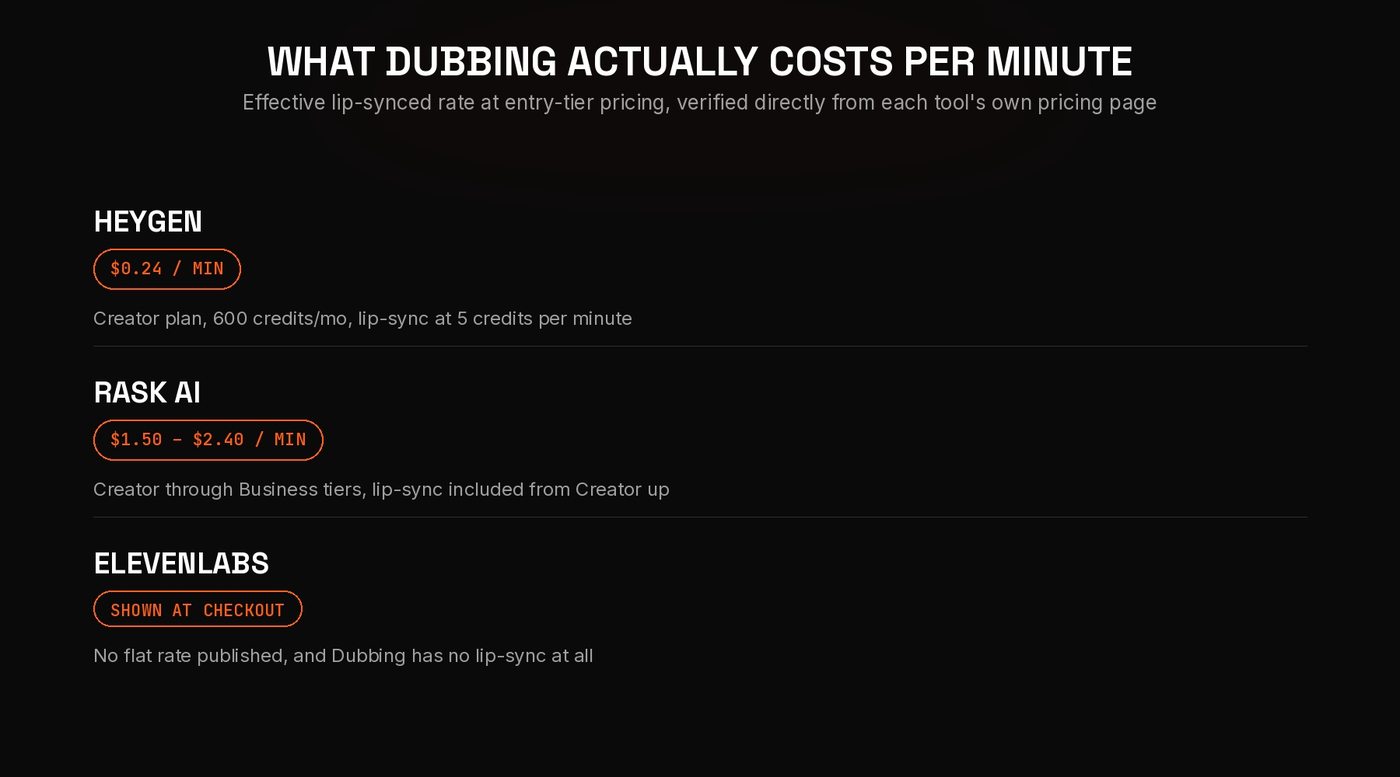
HeyGen's Creator plan is $29/month for 600 credits. Dubbing draws from that pool at two different rates depending on what you ask for: audio dubbing without lip-sync costs 2 credits per minute, full video translation with lip-sync costs 5 credits per minute. That works out to roughly 300 minutes a month of audio-only dubbing, or about 120 minutes a month of lip-synced dubbing, on the Creator plan. Per minute, that's roughly $0.10 for audio-only and $0.24 for lip-synced, the cheapest lip-synced dubbing of the three tools here by a wide margin. HeyGen supports 175+ languages and dialects on Creator and above (30+ on the free plan).
ElevenLabs
ElevenLabs' Starter plan is $6/month and unlocks Dubbing Studio. But per ElevenLabs' own help center, the cost of a dub "depends on the duration of your dub, and the number of languages you're dubbing into. The total cost will be displayed before you confirm your request," there's no published flat per-minute rate, you find out the price at checkout, every time. Dubbing is technically available even on the free plan, but free-tier dubs are automatically watermarked with no option to remove it, only paid plans dub without a watermark. The bigger limitation: per ElevenLabs' own documentation, "At the moment, ElevenLabs does not offer lip syncing as part of Dubbing." If you need the speaker's mouth to match the new language, ElevenLabs' dubbing product isn't the tool for that, its strength is voice quality on audio-only output.
Rask AI
Rask's Creator plan is $60/month for 25 minutes of localization, working out to roughly $2.40 per minute, the most expensive entry point of the three tools here, and that tier is translation only. Lip-sync isn't included until Creator Pro, $150/month for 100 minutes, which brings the effective rate for lip-synced dubbing down to roughly $1.50 per minute (standard lip-sync uses credits 1:1 with video length; an Enhanced Lip-sync option, currently in beta, uses 3 minutes of credit per 1 minute of video, tripling the effective cost). Business ($750/month, 500 minutes) holds the same roughly $1.50/minute rate for lip-sync, with added review workflows and a shared brand glossary on top. Extra minutes, available on Business, cost $3 each. Rask supports 135+ languages for translation.
A correction worth flagging: an earlier pass on this post had this backwards, citing lip-sync as included on Rask's $60/month Creator tier. Checking Rask's own pricing page directly, Creator's own feature list doesn't mention lip-sync at all, it's listed explicitly as a Creator Pro feature ("preserve speaker identity with lip-sync"), starting at $150/month. If lip-synced dubbing is what you actually need from Rask, the real entry price is $150/month, not $60.
Which tool actually fits your use case
If you need lip-synced dubbing at the lowest per-minute cost, HeyGen's credit system comes out cheapest by a wide margin, roughly a sixth of Rask's per-minute rate for the same lip-synced result. If lip-sync doesn't matter and voice quality is what you care about, ElevenLabs' audio-only dubbing is worth testing on its $6 Starter plan before committing to a bigger monthly number, just budget for the fact that the actual per-minute price isn't published anywhere, you'll see it at checkout. If you're localizing longer-form content with a small team that needs review workflows and brand terminology consistency, Rask's collaboration and glossary features are built for that, but expect to pay close to $1.50 a minute for it, and to start at the $150/month Creator Pro tier if lip-sync matters to you. This is the same pattern we found across AI video editing tools generally: the credit-metered plan that looks cheapest on the pricing page is rarely the one that's cheapest per unit of actual output.
How to estimate your real monthly cost
The sticker price is never the number that matters, this is: (minutes of video you publish per month) × (number of languages you're dubbing into) = total translation minutes needed. A creator publishing four 10-minute videos a month into three languages needs 120 minutes of translated output a month (10 × 4 × 3), not 40. Run that number against each plan's included minutes, not against the plan's advertised price, before deciding what actually fits your budget.
FAQ
Is AI dubbing actually cheaper than hiring a human translator and voice actor? For high volume or many languages at once, yes, per-minute AI costs are a fraction of human localization rates. For a single high-stakes video, the math is closer, and voice quality or lip-sync accuracy may not match a professional human dub.
Which AI dubbing tool has the most accurate lip-sync? Among the tools verified here, HeyGen and Rask AI both offer lip-synced dubbing as a core feature. ElevenLabs' Dubbing product does not offer lip-sync at all, per its own documentation, so it isn't a fair comparison on that specific feature.
Do I need lip-sync, or is audio-only dubbing enough? For talking-head content where the speaker's face fills the frame, lip-sync noticeably improves how natural the dub feels. For voiceover-style content, tutorials, or footage where the speaker isn't in frame for most of the video, audio-only dubbing is usually indistinguishable and considerably cheaper.
How many languages should I start with? Start with one or two languages that match where your actual audience data shows the most non-native-language viewers, then expand based on watch-time performance in those languages rather than guessing at a long list upfront.
Dubbing tools get you decent output for a low monthly number, but stitching together the right languages, the right voice, and the actual final published cut is still a production job. If you'd rather hand off the localization workflow entirely, book a call, or see how we actually run a project first.
Want Your Content Edited Like This?
Hand off the editing and keep the creative direction. EDITRS handles the rest.