How to Auto-Generate Viral Shorts and Reels From a Long YouTube Video

Turning one long video into several Shorts and Reels is a five-step process, and every step of it can be sped up with a tool. None of those tools replace the judgment calls that actually decide whether a clip is worth publishing, but they remove almost all of the manual work around that judgment. Here's the actual workflow, tools included, plus the part the tools don't do for you.
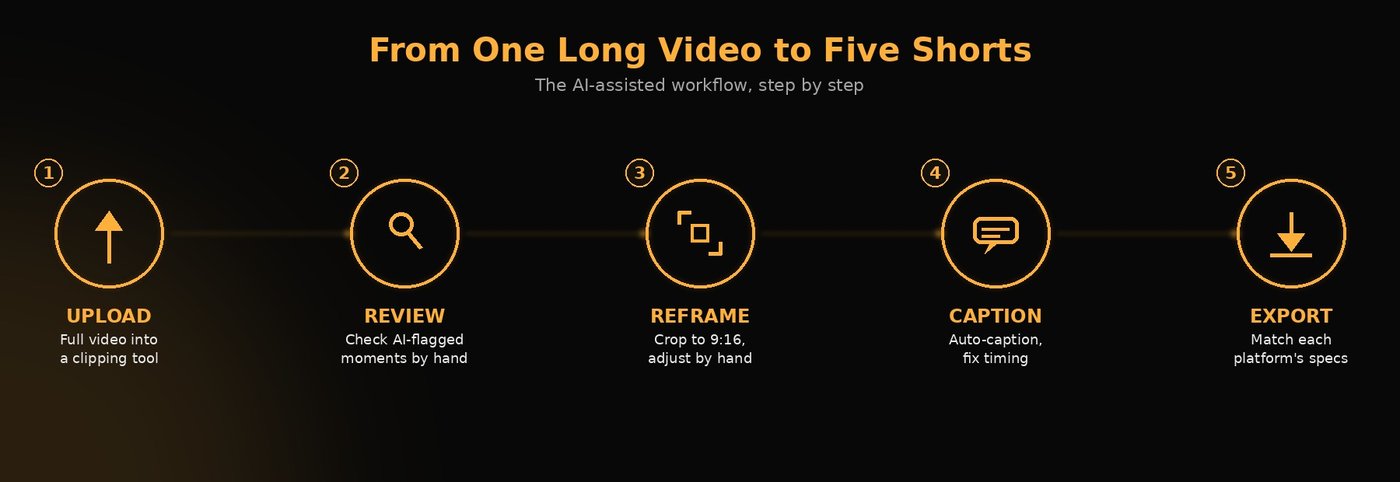
Step 1: Upload the long video to a clipping tool
Tools like OpusClip and Klap (covered in full in our OpusClip vs Klap comparison) both work the same basic way: upload a full-length video, and the tool scans it for moments likely to perform well as standalone clips. This is the step that used to take an editor hours of scrubbing through raw footage, now compressed into a single upload. We reach for OpusClip occasionally in our own workflow, but it isn't the tool we build around by default, most of the review and reframing work below still happens by hand.
Step 2: Review the AI-suggested moments, don't just accept them
Both tools score clips for likely performance (OpusClip's virality score, Klap's AI Reframe 2 among other signals), but a high score isn't the same as a correct one. The same logic we've written about for retention graphs applies here: a moment an AI flags as strong can genuinely be strong, or it can be a moment that's confusing or out of context once it's cut away from the full video. Every suggested clip needs a human pass before it goes anywhere, not just an export.
Step 3: Reframe to vertical
Shorts and Reels both expect a 9:16 frame. As covered in Reels vs long-form YouTube, this isn't just a resize, it's a composition decision, since a 9:16 crop removes everything a 16:9 shot used for context. Most clipping tools auto-reframe by tracking the main subject, but wide shots with multiple people or important background action often need a manual reframe pass to avoid cropping out something that mattered.
Step 4: Add captions built for muted viewing
Short-form platforms are built around scrollable, often-muted feeds, so captions are doing the work dialogue does in long-form, not just accessibility. Auto-caption features in most clipping tools handle the transcription accurately enough to start from, but timing and emphasis (what gets bolded, what appears a beat early to set up a punchline) usually still benefits from a manual pass.
Step 5: Export to match each platform's actual specs
Per what we verified directly from each platform's own documentation in Reels vs long-form YouTube: YouTube Shorts now allow up to three minutes, and Instagram Reels allow up to twenty, but Instagram states plainly that Reels over three minutes won't be recommended to new audiences. Exporting a clip that's technically allowed but outside the window each platform actually pushes to new viewers is a common way to lose reach without knowing why.
What the tools don't do for you
This is the part that decides whether the finished Shorts actually perform, and no clipping tool does it automatically:
- Deciding which flagged moment is actually worth publishing. A virality score is a starting point for review, not a final answer. We covered this exact problem in common editing mistakes that kill retention: treating an AI suggestion (or a retention spike) as automatically correct is one of the most common ways editors build more of the wrong thing.
- Chaining clips into a sequence that builds an audience, not just a single view. A long video often contains a natural sequence, a first solution, then a second, then a third. Clipping tools generally treat each moment as a standalone clip. Structuring a run of Shorts so each one sets up curiosity about the next is a judgment call a tool doesn't make.
- Catching the mistakes a fast export misses. Jump cuts that break continuity, captions and narration repeating the same information, an ending that runs past the actual payoff, the same list from common editing mistakes applies just as much to a 45-second Short as it does to a 12-minute video.
FAQ
Can AI tools fully automate turning a long video into Shorts? They automate the time-consuming parts, finding candidate moments, reframing to vertical, and generating captions, but not the judgment call of which moments are actually worth publishing or how they should be sequenced. A review pass is still necessary.
Do Shorts and Reels need to be under a specific length to perform well? Neither platform states a hard performance penalty tied to length, but Instagram explicitly states Reels over 3 minutes won't be recommended to new audiences, and YouTube classifies anything up to 3 minutes with a vertical or square aspect ratio as a Short. Staying inside those windows matters more for reach than for eligibility.
Is a high virality score from a clipping tool a guarantee a clip will perform? No. A high score reflects patterns the tool associates with strong performance, but the same signal (like a retention spike) can also indicate a confusing moment that forced a rewatch rather than a genuinely strong one. It's worth a manual review before publishing.
Why would the same footage need a different reframe for Shorts versus the original video? A 9:16 vertical crop removes context a 16:9 frame included, a second subject, background action, or other visual information. Auto-reframing tools track a main subject but can miss context that matters, so wide or multi-subject shots often need a manual reframe check.
Every step above can be sped up with a tool. None of them replace the judgment underneath it: which moment actually earns a spot in your next five Shorts, how they're sequenced, what mistake a fast export missed. That judgment is what we bring to every project we take on. Book a call and we'll walk through what that looks like on your own footage.
Want Your Content Edited Like This?
Hand off the editing and keep the creative direction. EDITRS handles the rest.