How to Turn One YouTube Video Into 10 Pieces of Content

Repurposing content is now the fifth most popular marketing trend of 2026, per HubSpot's own State of Marketing data, at 35.08% of marketers naming it a priority. But the same report found something less flattering: of the teams doing it, 49.4% just reuse the same content across platforms as-is, while only 39.5% actually tailor it for each one. That gap is the whole story. Repurposing isn't hard. Repurposing well is.
Figures below were pulled directly from HubSpot's own 2026 State of Marketing report on August 7, 2026. If you're reading this well after that date, worth a quick check that the numbers haven't shifted in a newer edition of the report.
Why most repurposing falls flat
Posting the same 9:16 crop to Shorts, Reels, and TikTok with no other changes counts as "repurposing" by the numbers, and it's also the version that underperforms. We covered why in Reels vs long-form YouTube: each platform has a different pacing expectation, a different first-three-seconds standard, and a different reason someone's watching. A clip that works on one rarely works on all three untouched.
HubSpot's same report backs up why this is worth the extra effort at all: short-form video posted its highest ROI of any content format in 2026, at 48.6%, ahead of long-form video (28.6%), live-streaming (25.1%), user-generated content (24%), and blog posts (22.3%). Short-form is where the return is. It's also the format most teams cut corners on.
The 10 pieces, and where each one actually earns its place
This is the breakdown we use internally when a client hands us one long-form upload and wants more mileage out of it. Not every video supports all ten, but most 15+ minute uploads with a clear talking point do.
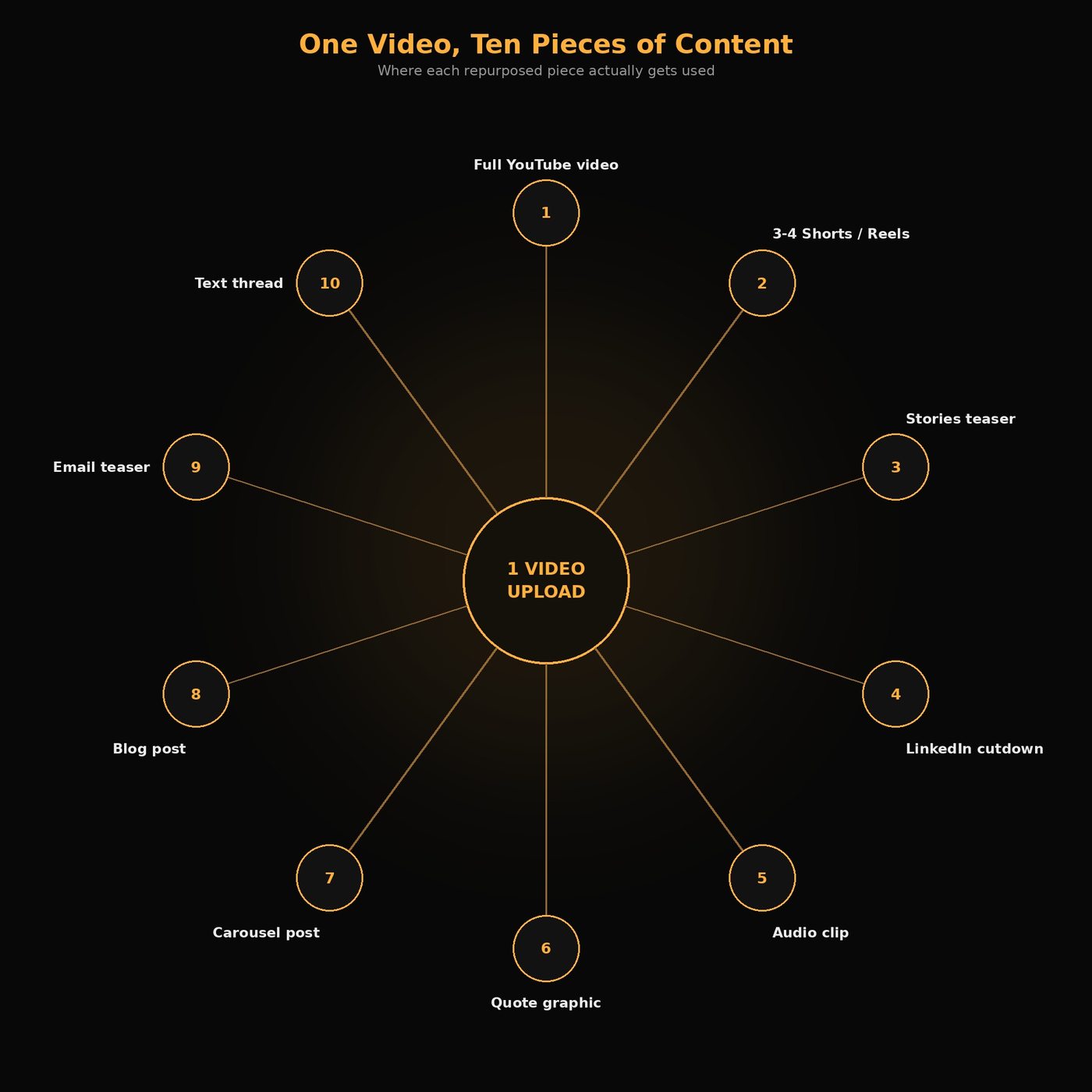
- The full YouTube upload. The hero asset, unchanged. Everything else is downstream of this.
- 3 to 4 vertical Shorts/Reels/TikToks, each cut from a different standalone moment, not the same 30 seconds re-exported three times with a different watermark.
- A 15-second Stories teaser for Instagram and YouTube, built as a hook with a swipe-up or link-in-bio push to the full video, not a trimmed-down Short.
- A LinkedIn-native cutdown, longer than the Shorts version, subtitle-forward since most LinkedIn video plays muted, reframed toward whatever's most professionally relevant in the clip.
- An audio clip or audiogram pulled from the same recording, for podcast feeds or audio-first platforms, useful if there's a strong spoken segment that doesn't need the visual.
- A quote graphic built from the single strongest line said on camera, for X or an Instagram feed post.
- A carousel post breaking the video's main points into a swipeable sequence of stills and captions, built for LinkedIn or Instagram, not just screenshots of the video.
- A blog post built from the transcript, restructured with headers and internal links, not the raw transcript pasted in.
- An email newsletter teaser, two or three sentences and a thumbnail, linking back to the full video.
- A text thread or community recap, the video's core argument written out for X or a subreddit where a video link alone won't land.
That's ten formats from one shoot, each doing a different job for a different audience, which is the part the 49.4%-verbatim group skips.
| Piece | Where it goes | Rough time to produce |
|---|---|---|
| 3-4 Shorts/Reels/TikToks | Shorts, Reels, TikTok | ~15-20 min each |
| Stories teaser | Instagram/YouTube Stories | ~10 min |
| LinkedIn cutdown | ~15-20 min | |
| Audio clip/audiogram | Podcast feeds, Spotify, Apple Podcasts | ~10-15 min |
| Quote graphic | X, Instagram feed | ~10 min |
| Carousel post | LinkedIn, Instagram | ~20-30 min |
| Blog post | Owned blog/SEO | ~45-60 min |
| Email teaser | Email newsletter | ~10 min |
| Text thread | X, Reddit/community | ~15-20 min |
These are rough per-piece estimates once the source footage is in hand, actual time varies with how much reframing or scripting a given clip needs.
If you're short on time, start here
You don't need all nine repurposed pieces to get most of the value. Per the ROI data above, prioritize the Shorts/Reels cuts first since short-form carries the highest return of any format. After that, pick one platform-specific cutdown that matches where your actual audience already is, LinkedIn if it's a B2B or professional topic, a quote graphic or thread if it's a stronger written argument than visual one, and the blog post if SEO and long-term search traffic matter more than social reach. Three pieces, chosen deliberately, beats ten pieces made half-heartedly.
Two of our own projects, two different starting points
We've run this exact repurposing pipeline for real clients, not just internally. For Xrayted Sports Network, we cut short-form clips from their long-form sports podcast to promote a show that's otherwise private, they purposely record with retakes built in, which meant clean, purpose-shot footage to pull moments from. For My Pet Hooligan, the source was the opposite: clips cut from streamer livestreams that happened organically, not scripted or shot with editing in mind. Same ten-piece framework both times, but how much of that footage is actually usable depends heavily on whether it was purpose-shot or just captured as it happened.
Where AI clipping tools fit in
Tools like Opus Clip and Klap can automate a real chunk of step 2, scanning a long-form video and surfacing candidate moments for Shorts and Reels, which saves the scrubbing-through-footage part of the job. We covered how that scoring works in how to auto-generate viral shorts: the tool flags likely moments based on patterns, it doesn't know which one is actually the strongest line in the video.
That's the same gap we wrote about in AI editing myths: a high virality score can mean a moment genuinely landed, or it can mean it was confusing enough to force a rewatch, and the AI can't tell the difference from the transcript alone. Every AI-suggested clip in step 2 still gets a human pass before it ships, same as every other AI-assisted step in this list.
What this actually takes
Ten pieces from one video isn't a five-minute export job. The clipping and captioning can be fast with the right tools, but the platform-specific reframing, the carousel copy, the blog restructuring, and the quote selection are judgment calls, the same mechanical-versus-judgment split we walk through end to end in inside our AI-enhanced editing workflow. That's usually the actual bottleneck for a solo creator or small team: not whether the tools exist, but whether there's time to make ten judgment calls instead of one export.
FAQ
Do I need to repurpose a video into all 10 formats every time? No. Most 15+ minute uploads with a clear talking point support all ten, but a shorter or more narrowly-scoped video might only justify three or four. Match the format count to what the source video actually supports.
Is it better to post the same clip everywhere, or customize it per platform? Per HubSpot's 2026 State of Marketing data, 49.4% of marketers currently reuse the same content across platforms as-is, while only 39.5% tailor it per platform. The tailored approach is more work, but it's also where the underperformance in verbatim reposting tends to show up.
Can AI tools handle the whole repurposing process? They can handle a meaningful chunk of it, especially surfacing candidate clip moments and generating captions. They can't reliably judge which moment is actually the strongest one, or rewrite copy for a platform's specific audience. That part still needs a human pass.
What's the highest-ROI piece to prioritize if I can only make a few? Per the same HubSpot data, short-form video posted the highest ROI of any format in 2026 (48.6%), so the vertical Shorts/Reels/TikTok cuts are usually the highest-leverage place to start if time is limited.
None of this works without the source video actually having something worth repurposing ten times. If you've got a channel putting out long-form content that's sitting at one format, one platform, we'll build the repurposing pipeline around it, cut the clips, tailor them per platform, and hand back ten pieces that actually look like they belong on each one. Book a call, or see our full editing workflow first.
Want Your Content Edited Like This?
Hand off the editing and keep the creative direction. EDITRS handles the rest.